


Land acknowledgments honour the history and presence of Indigenous peoples on the lands where we live and work. However, presenting a land acknowledgment typographically can prove challenging due to limited language support in many typefaces.
When I see a land acknowledgment, I am reminded that I am a guest in these lands and my attention is shifted to the people who were stewards of these lands for thousands of years. A land acknowledgment is a brief connection to the cultures of these first peoples through their languages and the way they are displayed matters.
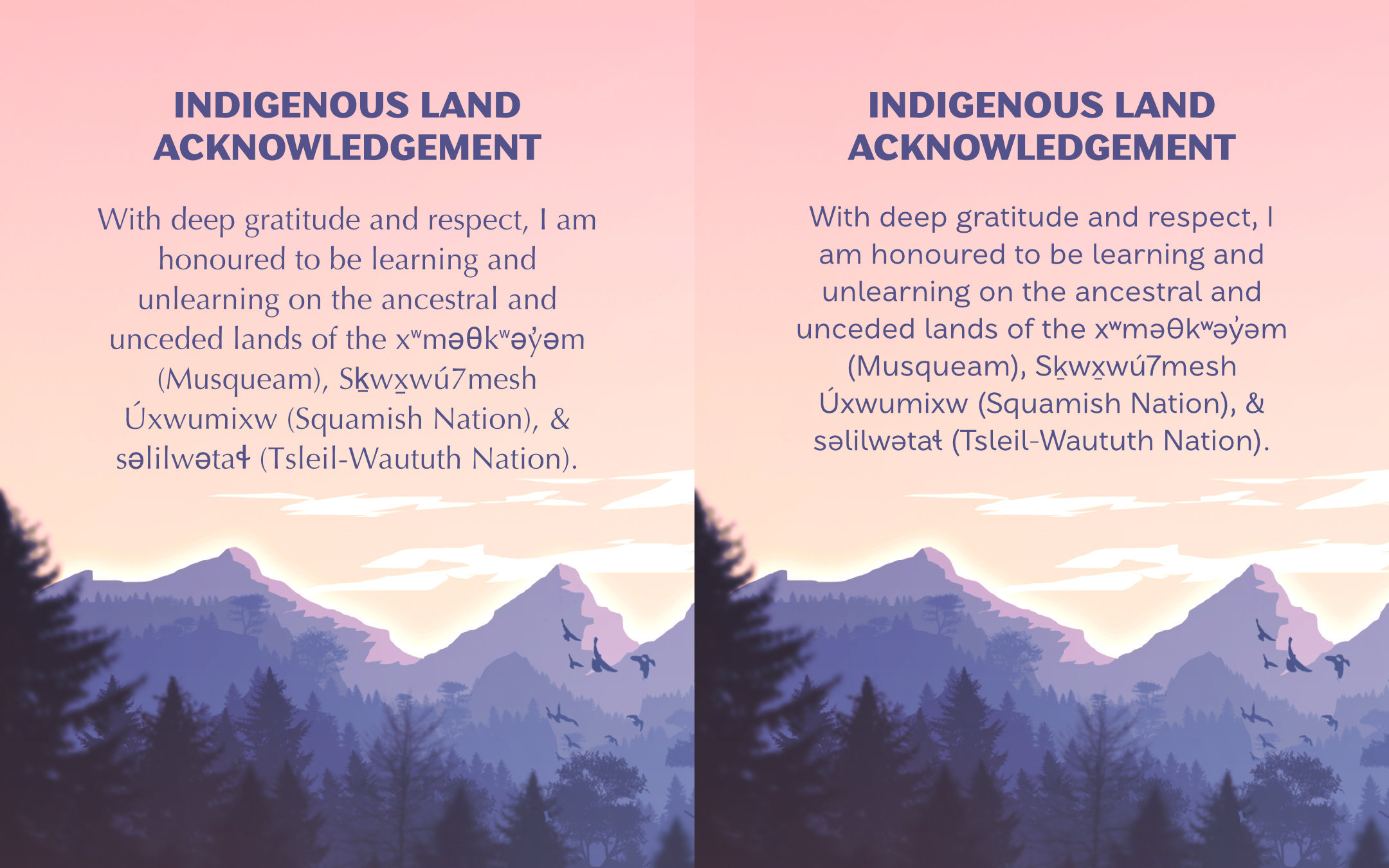
As a type designer, I look at a lot of letterforms, so I often notice the typefaces used to set these acknowledgments. I wondered if I was the only one who noticed that they were often typeset poorly, so I invited a few non-designer friends to look at the following poster and let me know if anything was wrong with it. They all responded that “it looked fine” but when I pressed them further by asking “can you see that some of the letters look darker than others?” “Can you see that some letters are taller or larger than others?” “Do the Indigenous words look smooth and coherent like the English words?” Their response was that they had noticed the discrepancies but they thought that maybe those languages were supposed to look like that. I can tell you that these languages are not meant to look this way and that a graceful and accurate representation of these words is a respectful gesture that is not difficult to implement.
Early writing systems for Indigenous languages were developed by missionaries and anthropologists that used linguistic systems to capture the sounds in these languages. Some were syllabic systems like those developed for Inuktitut and Cree but most others were based on characters mainly from Latin, Greek, and other symbols found in IPA (International Phonetic Alphabet). Today, communities lead this work themselves. Musqueam, for example, chose symbols from the North American Phonetic Alphabet (NAPA) for their alphabet because they can represent the sounds of hən̓q̓əmin̓əm̓ accurately. The majority of North American Indigenous languages today use much of the alphabet that English speakers will be familiar with alongside accent marks and symbols from Greek and IPA depending on how their language notation has developed. Some of these letters and symbols fall outside of the standard character set contained in many retail fonts, which means that finding a typeface that supports the necessary characters is an important step.
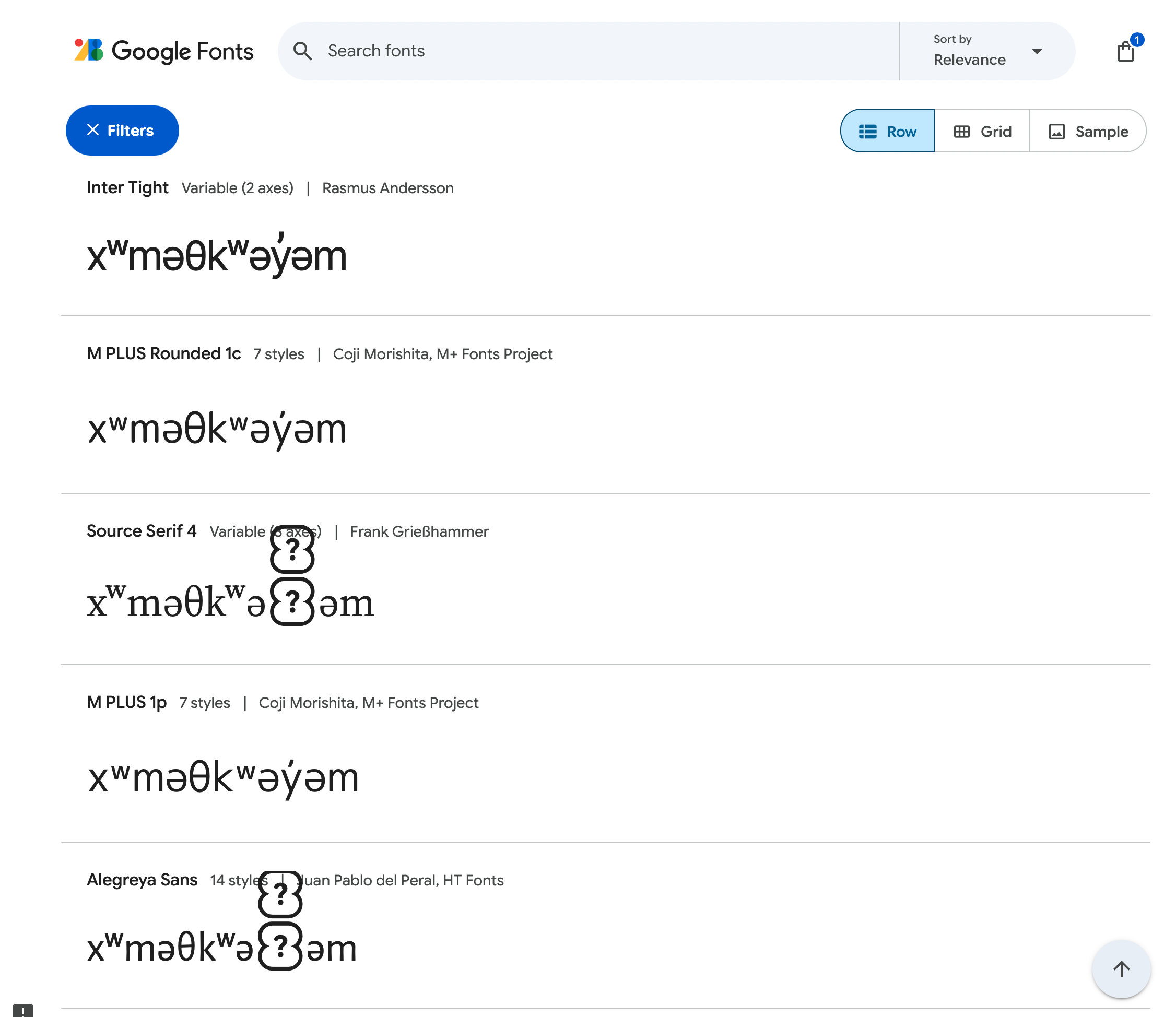
If you have chosen a typeface outside of Times New Roman or Arial, chances are that it may not support the Indigenous languages in your land acknowledgment. The first step is to find a font that has the necessary language support. You’ll know if your font is missing characters if you see something like this:

This means that the typeface does not have those characters and it will instead display a “not defined” character (sometimes also referred to as tofu). Sometimes though, to keep the text readable, instead of using a tofu character, the software will use a fallback font to display the missing characters. This keeps the text readable but creates visual inconsistencies like letters feeling too heavy or letters that appear to be a different height than the others.

Sometimes the fallback font will be very obviously wrong like the above example but sometimes it is more subtle so you need to look carefully:

First, figure out if the language is Latin-based or if it has its own syllabic script. Latin-based means that the language is written in the Latin script using a base Latin alphabet, often with some accents or characters found in other alphabets like IPA (International Phonetic Alphabet) and sometimes other scripts like Greek. If the language is Latin-based, Times New Roman and Arial are always available options but they are not very exciting and honestly don’t do a very good job (my personal opinion as a type designer). An easy way to search for more options is to go to Google fonts (or any other font library) and input the word you are looking for in the preview area, like xʷməθkʷəy̓əm for example. You’ll be able to quickly narrow down your options.
I have been adding Latin-based Indigenous languages to my character set over the last few years and Stornoway, Tofino, Kyoshi, Amberwood, and Sahlia currently all support Ahtna, Aleut, Algonquin, Gwich’in, hən̓q̓əmin̓əm̓, Hawaiian, Hopi, Lakota, Mohawk, Munsee, Navajo, Nisg̱a’a, Nuučaan̓uɫ, Potawatomi, Seri, Shawnee, Sḵwx̱wú7mesh, Tlingit, Zapotec, and Zuni. If you are looking for those languages, try out my typefaces. If you want me to add a language for you, get in touch—I’m happy to keep adding more!
If the language is in another script (not Latin-based) such as Canadian Syllabics, Cherokee, or Osage, you’ll have to do some research to find typefaces that support it. A good place to start is at Typotheque, who have recently been making a lot of effort toward supporting more global scripts and have been generously sharing their research publicly.
You can certainly try! Reach out to the font’s designer and see if they are willing to add the support. If they don’t have the time, see if you can get permission for someone else to add it and get in touch with me, I’m happy to expand language support of other typefaces with permission from the original type designer.
Once you have a typeface that supports the language, there are some design considerations for setting the land acknowledgment.
You may want to try to get a close match to the fonts you are using elsewhere in your design to keep the typography consistent. If you can find a variable font with similar letter shapes, you will be able to fine tune the weight so it matches more with your other fonts.
You can also use layout or a change in style (like making it italic) to make the change in font less noticeable or jarring to the viewer. Also note that it is best to set the entire paragraph in the alternative font—if you just set the language names in the alternate font it’s visually the same as when single letterforms are swapped, which is exactly what we are trying to avoid by selecting a font with appropriate character support.

If you haven’t made language support a priority in your type choice for a web project, you may not want to load an entire extra font for one paragraph. It may be better to fallback the entire paragraph to Times New Roman or Arial if web performance will be impacted.
Overall, it only takes a little effort to ensure that Indigenous languages are type-set with care and respect. This is often the first way that someone outside of Indigenous cultures will encounter and interact with Indigenous languages. The majority of these languages are endangered because of colonial efforts to erase them. Language revitalization is an important mission within Indigenous communities today, to preserve, reclaim, and pass down these languages to future generations. As that work continues and more typefaces grow their character sets, hopefully workarounds in typesetting Indigenous languages will be needed less often.
A fantastic Article in the Tyee about Revitalizing Indigenous Typography
A font for Microsoft that starts the conversation on the character set needed for supporting Salishan languages: Skeena Indigenous
Jan 16, 2025: Added a link to Typotheque for finding fonts that support other North American Indigenous Scripts. Updated list of my currently supported languages.
Sep 4, 2026: Rewrote the introduction, added the poster comparison, and updated the screenshot and information from Google fonts. Added the more reading links. Fixed some spelling mistakes 😅